A practical guide to cloud computing development services: what they include, how engagements are priced, migration strategies, cost control, and how to vet a partner.
Cloud Computing Development Services
Cloud computing development services are engineering engagements that design, build, migrate, and operate software on cloud infrastructure instead of servers you own. The category covers architecture design, application refactoring, migration execution, DevOps automation, security hardening, and ongoing cost governance. The confusion most buyers face is that "cloud services" gets used for three very different things: reselling infrastructure, managing infrastructure, and actually writing cloud native software. This guide separates them, then walks through the decisions that determine whether your cloud spend produces speed or just a bigger invoice.
Quick Answer: Cloud computing development services are engineering engagements that build and run applications on cloud platforms. They typically include architecture design, migration, containerization or serverless development, CI/CD automation, security and compliance setup, and cost optimization. Pricing ranges from roughly 30 to 150 USD per hour depending on region and seniority.
What Cloud Computing Development Services Actually Include
A real cloud development engagement produces working software and repeatable infrastructure, not just an account provisioned on AWS or Azure. Most credible scopes contain six workstreams.
- Architecture and assessment. Mapping current workloads, dependencies, data gravity, and latency requirements before choosing services.
- Application development or refactoring. Rewriting monolithic components into containers, managed services, or functions so they can scale horizontally.
- Migration execution. Moving data and traffic with rollback plans, dual-write windows, and cutover rehearsals.
- DevOps and platform automation. Infrastructure as code, CI/CD pipelines, environment parity, and observability.
- Security and compliance. Identity design, encryption, network isolation, audit logging, and framework alignment such as SOC 2, HIPAA, or GDPR.
- Cost and reliability operations. Right-sizing, autoscaling policies, commitment planning, SLOs, and incident response.
If a proposal is missing workstreams four through six, you are buying a prototype, not a production system.
Key Terms Defined
- Cloud native: software designed for elastic infrastructure using containers, managed services, and declarative automation.
- Lift and shift: moving a workload to cloud virtual machines with minimal code change.
- Refactor: restructuring the application to use managed cloud services directly.
- FinOps: the operating practice of tying cloud spend to engineering and business decisions.
Cloud Native Architecture: The Decisions That Matter
Architecture is where cloud budgets are won or lost, because infrastructure choices are hard to reverse once data lives in them. Three decisions carry the most weight.
Compute model. Containers on managed Kubernetes give you portability and fine-grained control at the cost of operational overhead. Serverless functions remove that overhead but constrain runtime duration, concurrency behavior, and dependency size. Managed platforms sit in between and suit most product teams shipping web applications.
Data placement. Egress fees and latency both follow data. Put compute next to the primary datastore, and treat cross-region replication as a deliberate cost decision rather than a default setting.
State boundaries. Stateless services scale cleanly. Every piece of local state, sticky session, or file written to disk becomes a scaling blocker later. Push state into managed databases, object storage, or caches from day one.
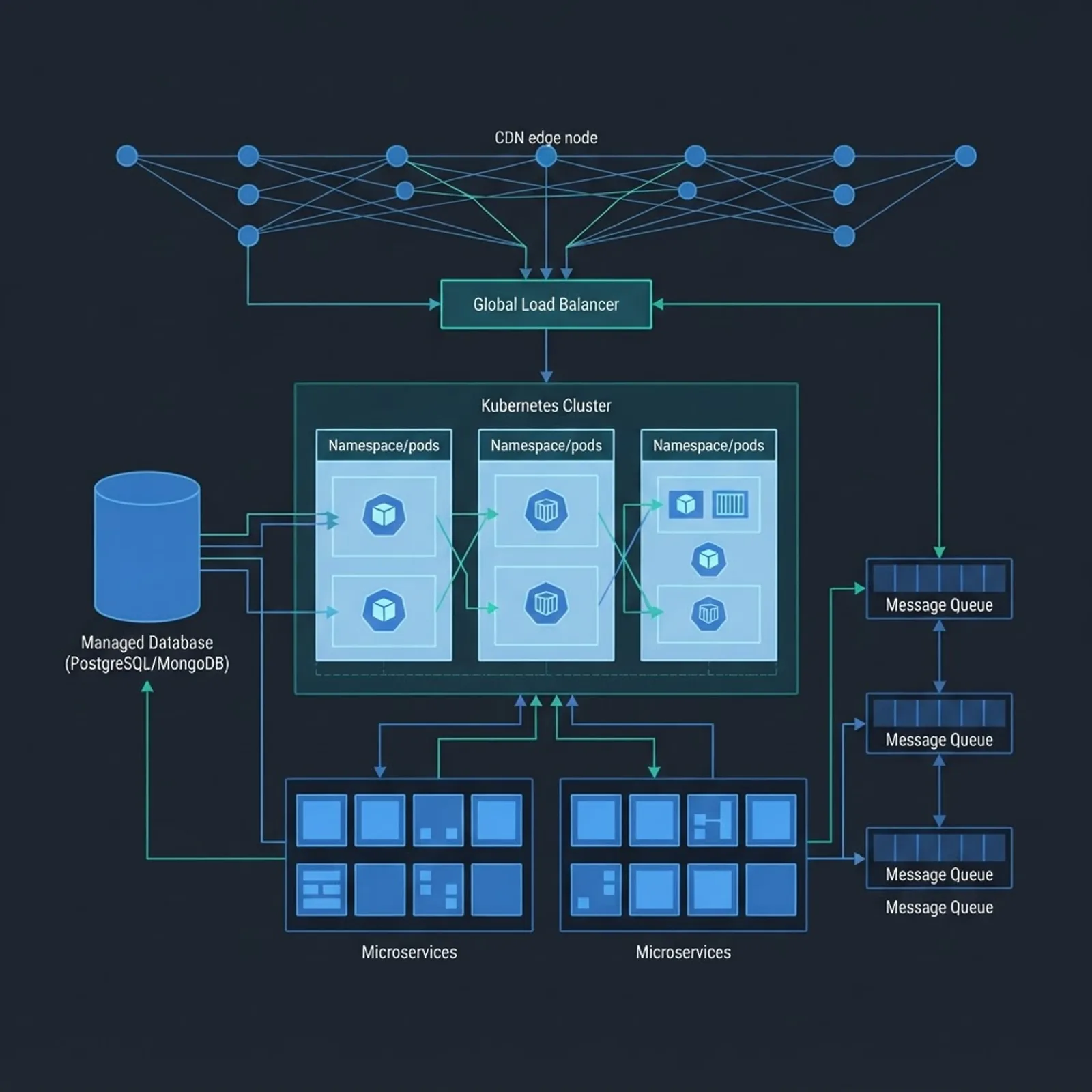
An honest observation from reviewing cloud builds: teams over-invest in Kubernetes and under-invest in observability. A cluster you cannot debug at 3 a.m. is more expensive than a simpler platform you can.
Migration Strategy: Choosing Between the Six Approaches
Migration failures usually come from applying one strategy to every workload. Assess each application separately and assign it a path.
| Strategy | What It Means | Best For | Typical Effort | Cloud Benefit |
|---|---|---|---|---|
| Rehost | Move as-is to cloud VMs | Deadline-driven exits from a data center | Low | Low |
| Replatform | Swap components for managed services | Databases, queues, caches | Medium | Medium |
| Refactor | Rewrite for cloud native patterns | Core revenue applications | High | High |
| Repurchase | Replace with SaaS | CRM, HR, ticketing | Low | Medium |
| Retire | Decommission | Unused internal tools | Very low | Cost savings |
| Retain | Leave in place | Latency-bound or regulated systems | None | None |
A workable sequence for most mid-market migrations:
- Inventory workloads and tag each with a strategy and an owner.
- Migrate one low-risk, high-visibility workload first to prove the pipeline.
- Replatform the data layer before refactoring application code.
- Run production traffic in parallel during cutover windows.
- Decommission legacy infrastructure on a scheduled date, not "eventually."
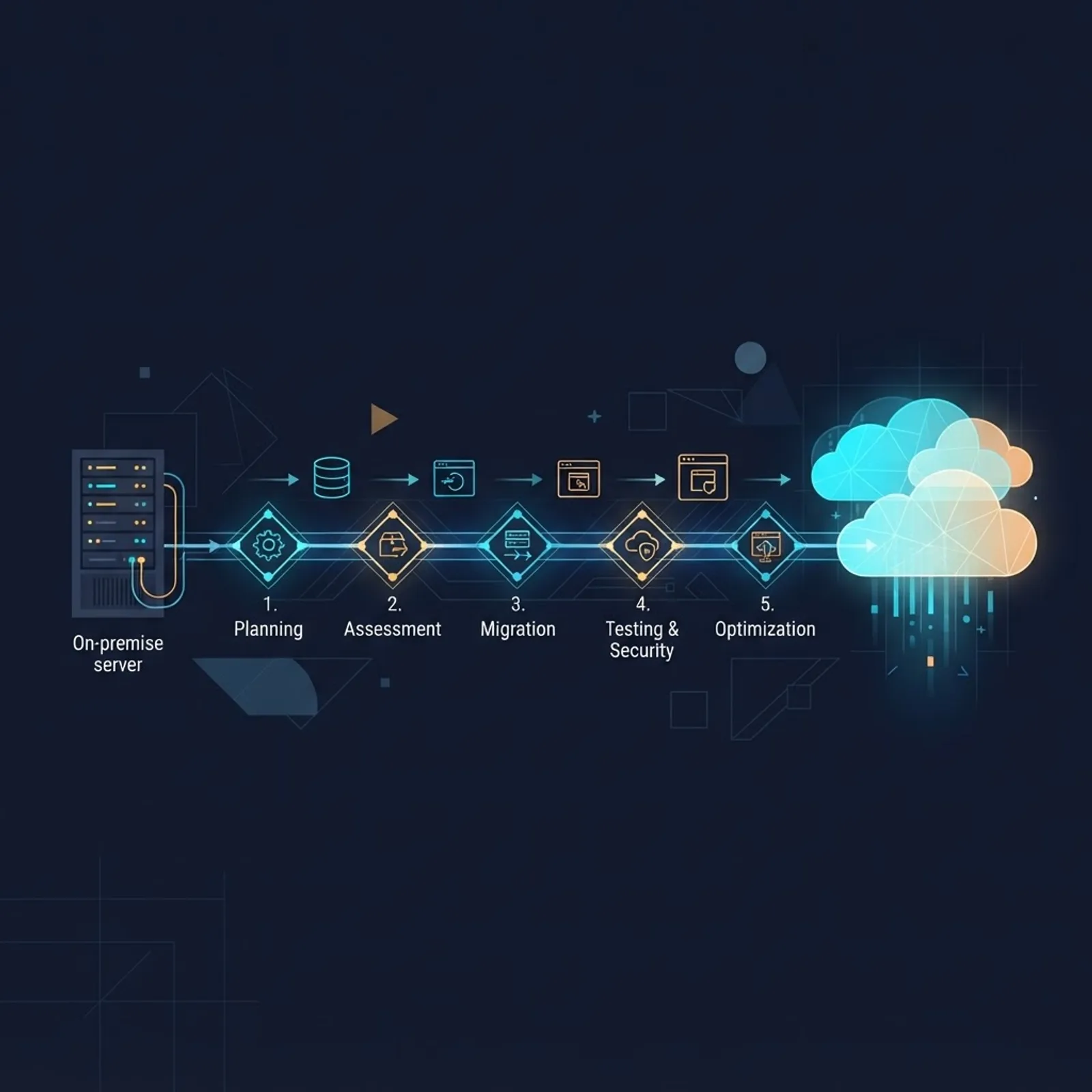
Step five matters more than it sounds. Paying for legacy hardware alongside cloud services is the most common reason cloud migrations appear to increase total cost.
Single Cloud or Multi-Cloud: An Evidence-Based Answer
Multi-cloud is often sold as risk reduction and delivered as complexity. Flexera's State of the Cloud research has consistently reported that a large majority of enterprises describe themselves as multi-cloud, yet most of those environments are the result of acquisitions and team-level choices rather than a designed strategy.
Use a single primary cloud when you have fewer than roughly 30 engineers, need speed, and have no contractual requirement for provider diversity. Add a second provider deliberately when a specific capability, data residency rule, or negotiated pricing floor justifies the duplicated tooling, duplicated on-call knowledge, and cross-cloud networking cost.
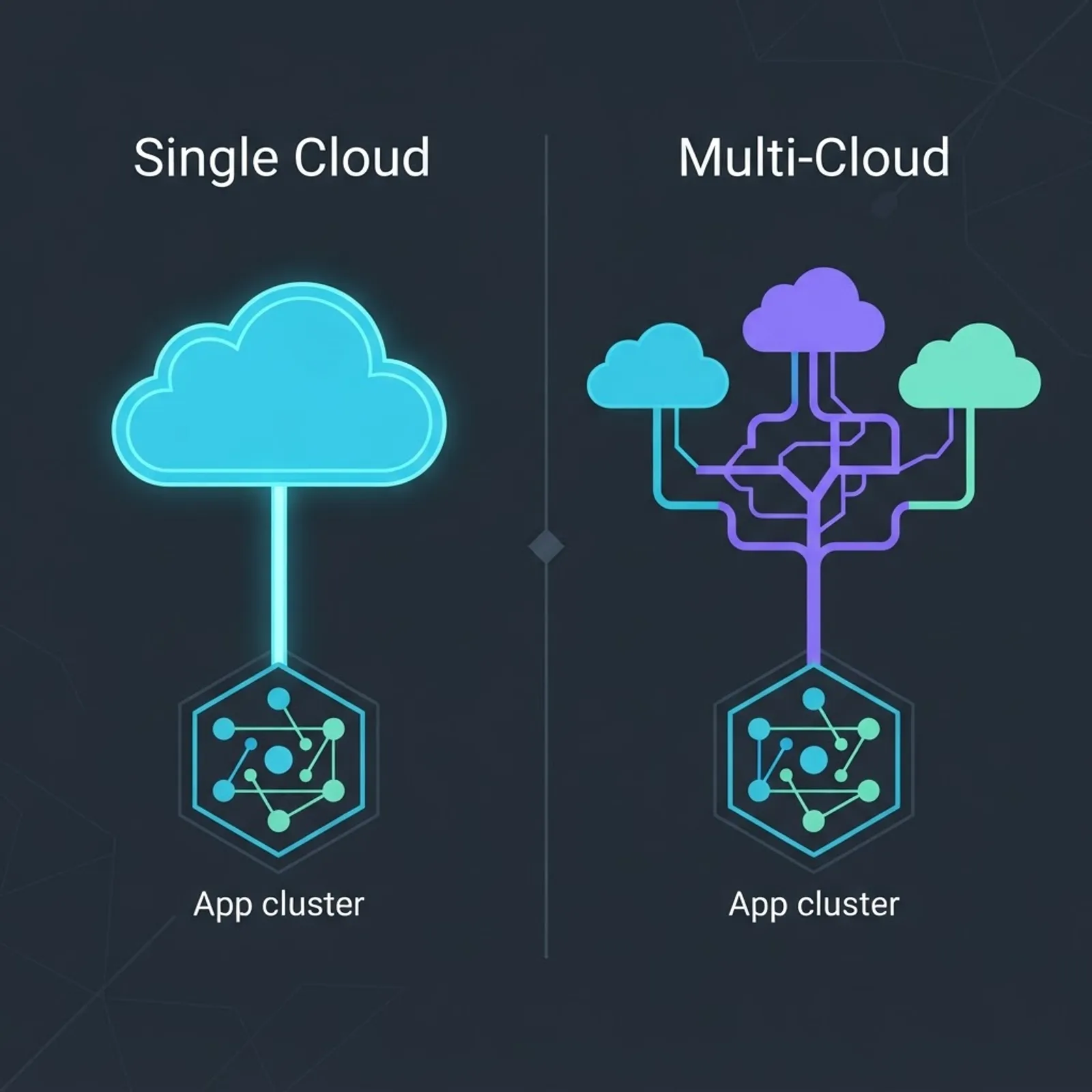
The practical middle path is portability without duplication: keep infrastructure in code, avoid deep proprietary lock-in for core business logic, and accept managed services where the productivity gain is large.
Serverless and Managed Platforms for Faster Delivery
Serverless development suits event-driven and spiky workloads because you pay per invocation rather than per idle hour. It is a poor fit for long-running batch jobs, workloads needing persistent connections, or latency budgets under a few milliseconds where cold starts are unacceptable.
Four patterns that consistently work in production:
- API plus functions plus managed database for CRUD-heavy products.
- Queue-buffered processing so bursts do not overwhelm downstream systems.
- Scheduled functions replacing always-on cron servers.
- Edge rendering with regional data access for global read-heavy applications.
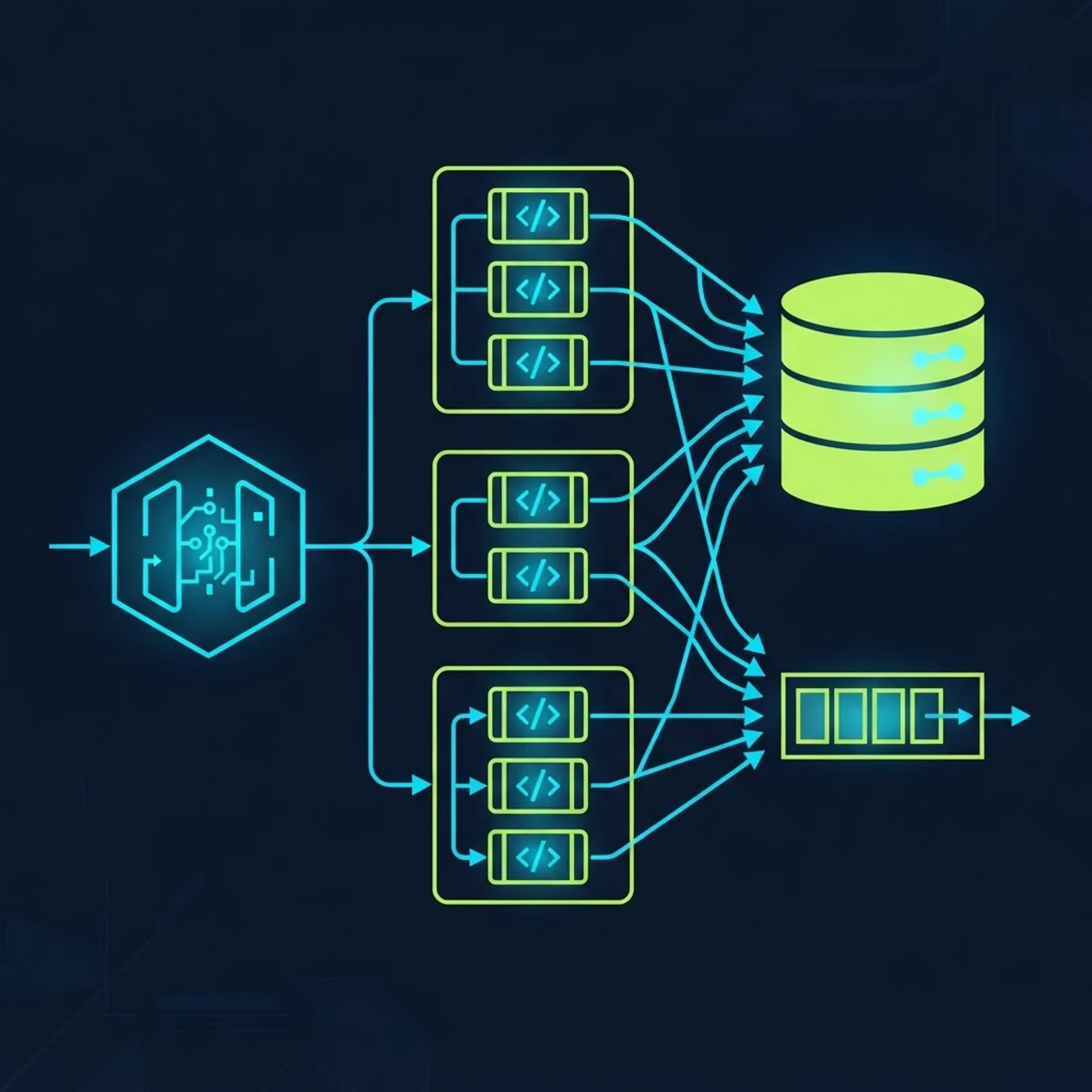
Teams building this way should still write integration tests against real cloud resources in an ephemeral environment. Local emulators drift from provider behavior, and that drift is where production incidents originate. Agencies that specialize in scalable web solutions typically bake ephemeral preview environments into the pipeline for exactly this reason.
Controlling Cloud Cost Before It Controls You
Cloud waste is measurable and largely preventable. Flexera's survey work has repeatedly found that organizations estimate roughly 27 to 30 percent of their cloud spend is wasted, and Gartner has publicly projected worldwide end-user spending on public cloud services surpassing 700 billion USD in 2025. At that scale, a few percentage points of discipline is a material number for any single company.
Six controls that produce savings within one quarter:
- Right-size compute using two weeks of real utilization data, not launch-day guesses.
- Set autoscaling floors and ceilings so idle capacity shrinks overnight.
- Apply storage lifecycle rules to move cold objects to cheaper tiers automatically.
- Buy commitments only for steady baseline load, never for experimental workloads.
- Tag every resource by team and environment so cost has an owner.
- Alert on cost anomalies daily, because a misconfigured job discovered in 24 hours costs far less than one found on the monthly invoice.

Security, Compliance, and Operational Reliability
Cloud providers secure the infrastructure; you remain responsible for identity, configuration, and data. That shared responsibility line is where most breaches occur, and misconfiguration rather than provider failure is the recurring root cause.
A baseline that should be non-negotiable in any engagement:
- Least-privilege roles with no long-lived static keys, using workload identity federation instead.
- Encryption in transit and at rest with managed key rotation.
- Private networking for databases, with no public endpoints by default.
- Centralized audit logging retained per your compliance framework.
- Automated configuration scanning in CI so drift is caught before deploy.
- Tested restore procedures, because an untested backup is a hypothesis.
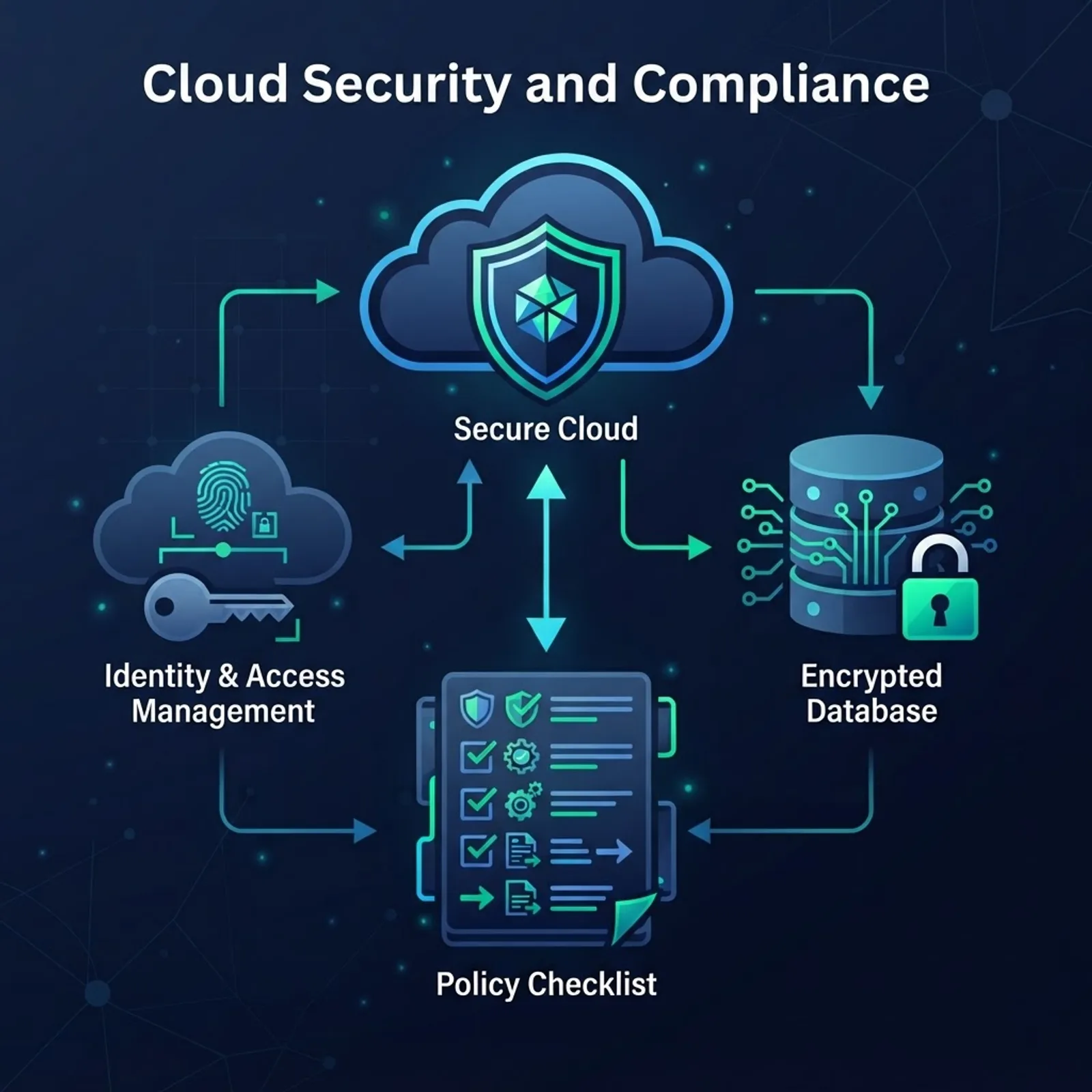
Reliability follows the same logic. Define service level objectives, instrument the four golden signals of latency, traffic, errors, and saturation, and run at least one game day per quarter where you deliberately fail a dependency.
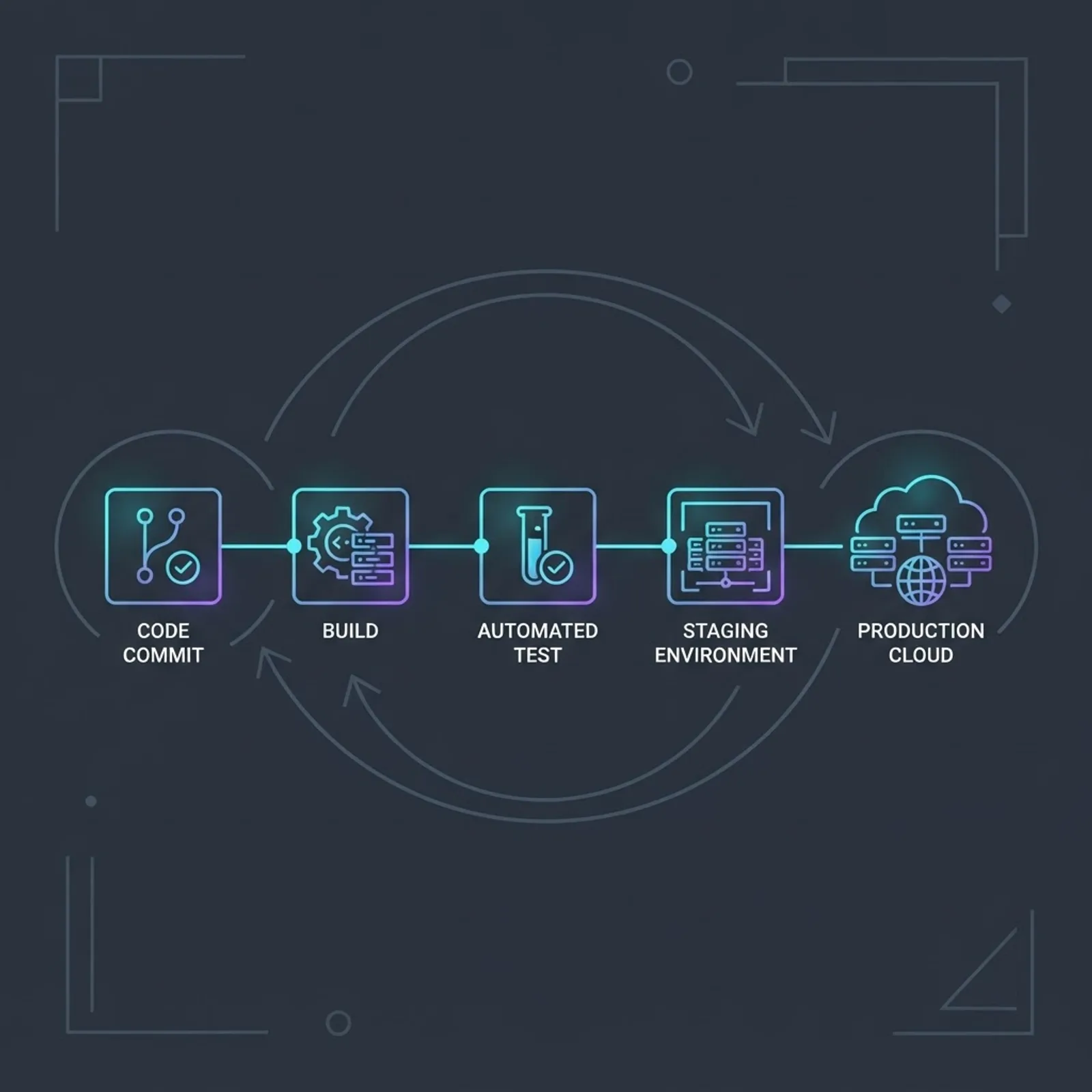
How to Evaluate a Cloud Development Partner
Vendor selection is a technical exercise, not a sales conversation. Ask for evidence rather than logos.
- Request an architecture diagram from a comparable past project, redacted as needed.
- Ask who owns the cloud accounts and the infrastructure code at the end of the engagement. The answer should be you.
- Confirm the engineers writing your code are the ones in the meeting, not a bench you never meet.
- Ask how they handle rollback and what their last production incident taught them.
- Require a written cost model with projected monthly spend at expected traffic.
Teams comparing shortlists often weigh a specialist against a broader engineering partner. Reviewing a delivery-focused shop such as ZoneTechify alongside a senior-only team like WebPeak Digital is a reasonable way to see how different operating models price the same scope, since one may lead with breadth of services and the other with depth of engineering ownership.
Key Takeaways
- Cloud computing development services span architecture, migration, application development, DevOps automation, security, and cost operations. Missing the last three signals an incomplete scope.
- Gartner has projected global public cloud end-user spending above 700 billion USD in 2025, while Flexera survey data puts self-reported cloud waste near 27 to 30 percent.
- Assign a migration strategy per workload using the rehost, replatform, refactor, repurchase, retire, and retain framework instead of one blanket approach.
- Single cloud is the correct default for most teams under 30 engineers; multi-cloud should be a deliberate, funded decision.
- Misconfiguration, not provider failure, drives most cloud security incidents, so automated configuration scanning belongs in CI.
- Always retain ownership of cloud accounts and infrastructure as code at the end of any vendor engagement.
Frequently Asked Questions (FAQ)
What are cloud computing development services?
They are engineering services that design, build, migrate, and operate software on cloud platforms. A typical scope includes architecture assessment, application refactoring or new development, migration execution, CI/CD automation, security configuration, and ongoing cost and reliability management for the deployed workloads.
How much do cloud development services cost?
Hourly rates commonly range from about 30 to 150 USD depending on region and seniority, while fixed-scope migration projects often land between 15,000 and 150,000 USD. Ask for a projected monthly infrastructure bill separately, since platform spend is usually not included in the service fee.
How long does a cloud migration take?
A single application with a clean architecture can move in four to eight weeks. Multi-application enterprise migrations typically run six to eighteen months. The largest variables are data volume, undocumented dependencies, and how quickly stakeholders approve cutover windows rather than the engineering work itself.
Is serverless cheaper than containers?
Serverless is usually cheaper for spiky, low-to-moderate traffic because you pay only for execution. Containers become more economical at sustained high throughput where reserved capacity beats per-invocation pricing. Model your actual request pattern before choosing, since the crossover point differs by workload.
Should I choose AWS, Azure, or Google Cloud?
Pick based on your existing stack and team skills, not market share. Azure fits organizations already standardized on Microsoft identity and tooling. Google Cloud appeals to data and machine learning workloads. AWS offers the broadest service catalog and the deepest hiring pool for experienced engineers.
Do I need a DevOps engineer for cloud development?
You need the capability, not necessarily a dedicated hire. Small teams can rely on a development partner who delivers infrastructure as code and automated pipelines. Once you run multiple production environments or handle compliance audits, a dedicated platform or DevOps engineer becomes the cheaper option.